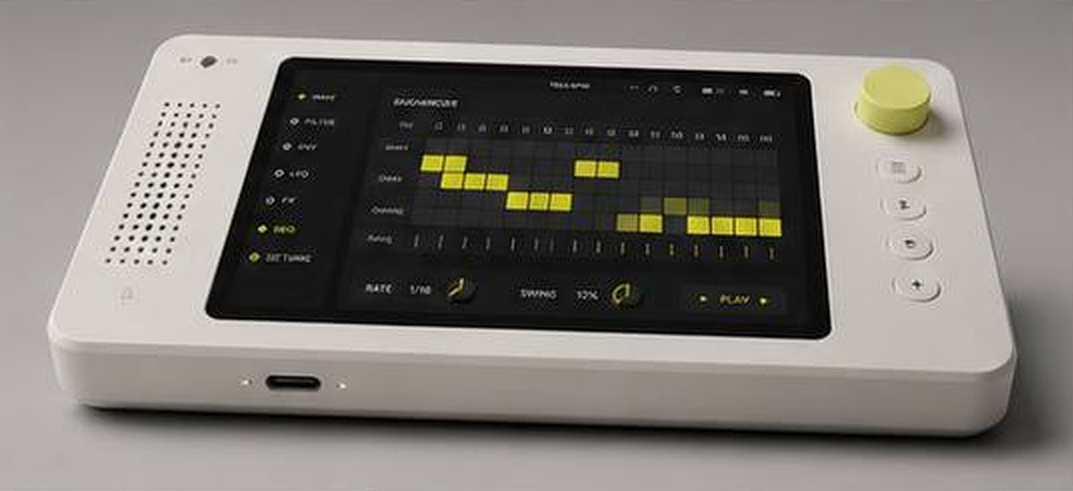
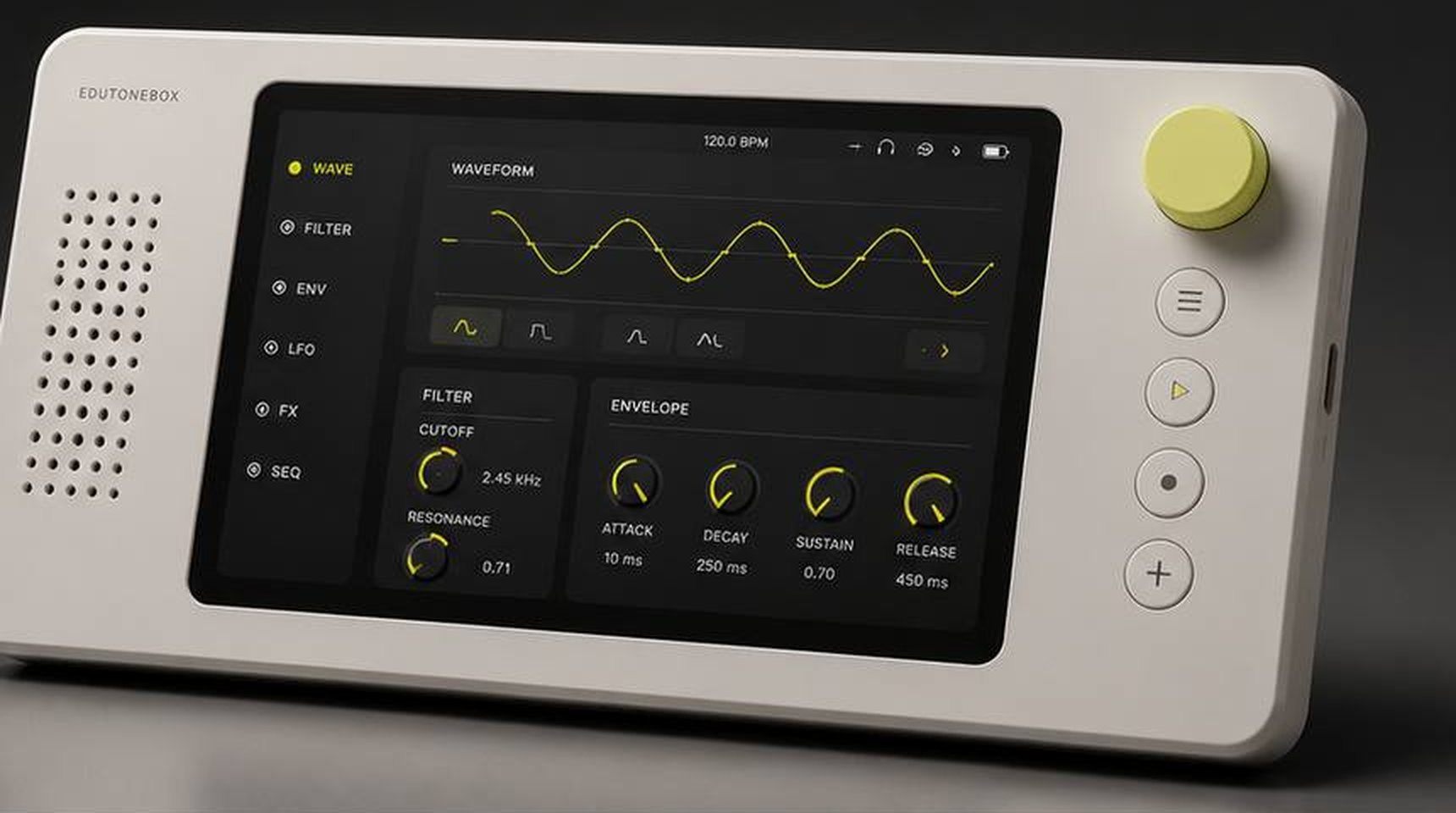
Technical Documentation
Real-time educational synthesizer — C++17 DSP engine, Qt6/QML interface, Raspberry Pi deployment
I've been teaching synthesis for years. For most of that time, I've wanted a tool that lets students actually see what's happening — not just hear it, but watch a waveform change shape in real time, watch an envelope rise and fall, watch a filter sweep across a spectrum. I finally stopped waiting for someone to build it. EduToneBox is for my students, but honestly it's also for me. I'm obsessed with looking closely at things — getting microscopic, getting immersed. Synthesis is beautiful when you can see it. That's what this is trying to show. And while it starts in the classroom, I expect it'll travel — the kind of tool that finds its way into studios, onto workbenches, and into the hands of people who weren't looking for a synthesizer but can't put it down once they find one.
EduToneBox is a physical, real-time educational synthesizer prototype built around a C++17 DSP engine, a Qt6/QML control surface, and OSC-over-UDP communication, deployable on both macOS and Raspberry Pi. The goal is to make core sound synthesis concepts visible and playable: waveform shape, frequency, amplitude, LFO modulation, ADSR envelopes, multi-algorithm filtering, effects, and real-time FFT spectrum visualization feeding back to the UI.
The project is structured as a portfolio-grade systems project rather than a single demo script. It includes platform-specific audio backends, reusable DSP modules, a desktop and Raspberry Pi UI, automated tests, and deployment scripts for both macOS and Raspberry Pi. The Raspberry Pi build path adds ALSA, FFTW3, and ARM/NEON optimization hooks with full deploy and audio-test scripts.
This project is actively in development. Current test status: 33 of 34 CTest tests pass. The single known failure predates PolyBLEP band-limiting implementation and expects hard-edge waveform samples — the fix is understood and queued. The roadmap below describes near-term engineering work and longer-term product direction.
The audio engine and UI are deliberately separate processes, connected by OSC over UDP on localhost. This keeps UI crashes and graphics performance isolated from audio generation, makes the DSP modules independently testable, and leaves the door open for future hardware control sources.
+---------------------------------------------+
| Qt6/QML UI Process                          |
| Controls, visualizations, theme, pages      |
+----------------------+----------------------+
                       | OSC over UDP
                       | localhost:4559
+----------------------v----------------------+
| C++ Audio Engine Process                    |
| OSC server, DSP graph, audio callback       |
+----------------------+----------------------+
                       |
+----------------------v----------------------+
| Platform Audio Backend                      |
| CoreAudio on macOS · ALSA on Linux/Pi       |
+---------------------------------------------+
Oscillator
  → ADSR envelope
  → FilterBank (optional)
  → EffectsProcessor (optional)
  → output safety handling
  → CoreAudio or ALSA device
QML control change
  → OSCClient
  → UDP OSC message
  → OSCServer handler
  → AudioEngine parameter update

Audio buffer
  → FFT analysis
  → /spectrum/bin OSC messages
  → UI spectrum visualization
Real-time mono synthesis at 44.1 kHz with a default 512-sample buffer.
The Qt6/QML application presents a multi-page synthesizer interface intentionally designed as a fixed-aspect hardware-style instrument panel rather than a generic desktop form. Large controls, fixed 4:3 scaling, and pages organized by synthesis concept make it suitable for teaching rather than just operation.
| Language | C++17 |
| Build | CMake 3.20+ |
| UI | Qt6, QML, Qt Quick Controls |
| Tests | Catch2, CTest |
| macOS audio | CoreAudio, AudioToolbox, Accelerate/vDSP |
| Linux/Pi audio | ALSA |
| Linux/Pi FFT | FFTW3 |
| IPC | OSC-style UDP messages |
| DSP support | Local sndkit-derived modules for filters, effects, and helpers |
AUDIO_BOX/
├── CMakeLists.txt
├── README.md
├── commands/
│   ├── mac/          Clickable macOS command wrappers
│   └── pi/           Raspberry Pi desktop launchers
├── deploy/
│   ├── mac/          macOS build, test, run, sync scripts
│   └── pi/           Pi install, build, run, audio-test scripts
├── docs/             Planning and deployment docs
├── src/
│   ├── audio_engine/
│   │   ├── AudioEngine.*     Main synthesis engine and audio backend
│   │   ├── Oscillator.*      Waveform generation and PolyBLEP
│   │   ├── LFO.*             Modulation source
│   │   ├── ADSR.*            Envelope generator
│   │   ├── SVFilter.*        State variable filter
│   │   ├── FilterBank.*      Multiple algorithms behind one interface
│   │   ├── EffectsProcessor.* Reverb, delay, modulation, distortion
│   │   ├── OSCServer.*       UDP OSC control server
│   │   └── sndkit/           Embedded DSP helper modules
│   └── ui_app/
│       ├── OSCClient.*       Qt UDP OSC client
│       ├── main.cpp
│       └── qml/              Instrument UI pages and controls
└── tests/
    ├── test_oscillator.cpp
    ├── test_lfo.cpp
    ├── test_adsr.cpp
    └── test_svfilter.cpp
The OSC control API is fully documented. The audio engine listens on
localhost:4559
. All control messages follow the OSC address pattern below.
| Address | Value | Meaning |
|---|---|---|
| /osc/frequency | float | Frequency in Hz |
| /osc/amplitude | float | Output amplitude, 0.0 to 1.0 |
| /osc/waveform | int as float | 0 Sine · 1 Triangle · 2 Saw · 3 Square · 4 Pulse · 5 Custom |
| Address | Value | Meaning |
|---|---|---|
| /osc/lfo/frequency | float | LFO rate |
| /osc/lfo/amplitude | float | LFO depth |
| /osc/lfo/waveform | int as float | 0 Sine · 1 Triangle · 2 Saw · 3 Square |
| /osc/lfo/target | int as float | 0 None · 1 Frequency · 2 Amplitude · 3 Filter |
| Address | Value | Meaning |
|---|---|---|
| /osc/adsr/attack | float | Attack time in ms |
| /osc/adsr/decay | float | Decay time in ms |
| /osc/adsr/sustain | float | Sustain level, 0.0 to 1.0 |
| /osc/adsr/release | float | Release time in ms |
| /osc/adsr/noteon | — | Trigger envelope |
| /osc/adsr/noteoff | — | Release envelope |
| Address | Value | Meaning |
|---|---|---|
| /osc/filter/cutoff | float | Cutoff frequency in Hz |
| /osc/filter/resonance | float | Resonance/Q |
| /osc/filter/type | int as float | 0 LowPass · 1 HighPass · 2 BandPass · 3 Notch |
| /osc/filter/enabled | float | 0 off · 1 on |
| /osc/filter/algorithm | int as float | 0 StateVariable · 1 Butterworth · 2 VirtualAnalog · 3 ModalResonator |
| Address | Value | Meaning |
|---|---|---|
| /osc/effect/type | int as float | 0 None · 1 Reverb · 2 Delay · 3 Chorus · 4 Flanger · 5 Distortion · 6 BitCrusher |
| /osc/effect/mix | float | Dry/wet mix |
| /osc/effect/param1 | float | Effect-specific normalized parameter |
| /osc/effect/param2 | float | Effect-specific normalized parameter |
| Address | Values | Meaning |
|---|---|---|
| /spectrum/bin | bin index, magnitude | FFT spectrum bin sent from engine to UI |
Unit tests are written in Catch2 and run via CTest. Current coverage:
Not yet covered: OSC parser, full engine integration, effects, filter-bank algorithms, and UI behavior. These are listed in the near-term roadmap.
/osc/pulsewidth
and
/osc/adsr/curvetype
The split-process architecture keeps UI crashes and graphics performance separate from audio generation. OSC is simple enough to inspect manually, portable across languages, and a natural fit for future hardware control sources.
DSP modules are kept as plain C++ classes with explicit state and parameter setters — straightforward to unit test, reuse, and eventually move into a plugin or embedded target. The UI is intentionally instrument-like: large controls, fixed 4:3 scaling, pages organized by synthesis concept, and visual feedback designed for teaching rather than decoration.
The interesting aspect of this project is not only that it produces sound — it is that the codebase is organized to grow from a desktop prototype into a physical educational instrument.